
Top 12 Best at Home Launch Monitor You Can’t Miss Today
Using a launch monitor that constantly loses connection or provides inaccurate readings can turn practice sessions into frustrating experiences. The best at home launch monitor delivers reliable data quickly, ensuring every shot can be analyzed without wasted time. Cheaper models often struggle with inconsistent ball tracking, which makes it difficult to improve your swing or understand your game better.
Key factors that separate a solid launch monitor from a poor one include accurate radar or camera tracking systems that can capture ball speed and launch angle consistently. The device should be compact enough to fit comfortably in your practice area, typically no larger than a small tablet, and have a battery life that supports multiple sessions, usually at least a couple of hours. Durability and ease of setup also matter, especially when the monitor will be moved or stored after each use.
Need a Quick Check?
| Image | Product | Price |
|---|---|---|
Our Top Picks 1  | Rapsodo Mobile Monitor | Check Price |
Our Top Picks 2  | Rapsodo MLM2PRO Monitor | Check Price |
Our Top Picks 3  | Garmin Approach R10 | Check Price |
Our Selected Top 12 at Home Launch Monitor You Can Trust
This list features reliable at home launch monitors designed for golf enthusiasts of various skill levels. Each review explains performance, ideal users, and highlights strong and weak points to help you make an informed choice based on your specific needs and preferences.
1. Rapsodo Mobile Launch Monitor
Getting accurate feedback on your golf swings at home can be tricky, but this device manages it well for players practicing anywhere from a driving range to a backyard. It’s best suited for golfers wanting detailed shot data and visual feedback without needing a professional setup.
Setup is straightforward, just place the unit behind the ball and connect via touchscreen controls. It fits easily into daily use by providing data like ball speed, launch angle, and carry distance immediately after each shot.
Recording swings with a built-in video replay and shot tracer helps spot mistakes right away, which makes each practice session count.
The launch monitor accurately measures key swing metrics as promised. The build is compact and lightweight at just 14.1 ounces, making it easy to carry around or store. The biggest praise highlights how helpful the shot tracer video is for visual learning.
Some users have noted that its data distance measurements can vary, depending on the environment.
The most praised feature is the video replay with shot tracer that clearly shows ball flight, making it easy to analyze swings visually. A frequent downside is the inconsistency in carry distance measurements depending on where it is used.
Golfers looking for detailed swing feedback and convenient use around the home or range will find it a helpful tool. Those needing consistently precise distance tracking may want to explore other launch monitors designed for professional accuracy.
Pros
- Provides detailed shot data including carry distance
- Lightweight and portable for practice anywhere
- Video replay with on-screen shot tracer
- Easy touchscreen operation
Cons
- Distance readings can vary by environment
- Batteries need occasional replacement
| Specification | Details |
|---|---|
| Item Weight | 14.1 ounces |
| Dimensions | 6.85 x 7.72 x 2.28 inches |
| Batteries | 1 Lithium Polymer battery (included) |
| Model Number | MLM01 |
| Warranty | 1-year limited warranty, 30-day return policy |
2. Rapsodo MLM2PRO Mobile Launch Monitor
Dual shot track accuracy through Doppler radar and dual cameras makes this launch monitor perfect for serious golfers wanting detailed shot analysis. It suits those who want to measure a wide range of metrics from their home setup, with reliable and precise data to help improve faster.
Setting it up is straightforward, especially with the included tripod and carrying case. It connects easily and tracks 15 key metrics like spin rate, club speed, and launch angle during everyday practice sessions.
The included 21-day premium trial opens up simulated courses and advanced training features, making daily use more engaging and productive.
The main strength lies in the mix of advanced radar technology and dual cameras, delivering consistent and accurate feedback on shots in real time. The device’s plastic build keeps it lightweight at 16 ounces, which is handy for moving around the home or garage.
The most frequent praise highlights its accuracy, while the main drawback often mentioned is the short duration of the premium trial before requiring a paid membership.
Accuracy on every shot is frequently praised, with data tracking supported by radar and dual cameras. The premium trial offers excellent features but is seen as too short, requiring subscription to keep full access after three weeks.
Golfers looking for detailed, reliable shot metrics will appreciate this device for home practice. Those who prefer a longer free access period or sturdier materials might look into other models before committing.
Pros
- Accurate tracking with Doppler radar and dual cameras
- Captures 15 key shot metrics for detailed feedback
- Includes tripod and carrying case for easy setup
- Access to 30,000+ simulated courses with premium trial
Cons
- Premium membership trial lasts only 21 days
- Plastic body may feel less durable to some users
| Specification | Details |
|---|---|
| Item Weight | 16 ounces |
| Item Dimensions LxWxH | 5.51 x 9.45 x 3.94 inches |
| Package Weight | 1.29 kg |
| Model Name | MLM2PRO |
| Included Components | Tripod, Carrying Case, Charging Cable, 3 Callaway® RPT™ Chrome Soft X® Golf Balls |
3. Garmin Approach R10 Portable Launch Monitor
Golfers looking to practice at home or on the range will find the Garmin Approach R10 Portable Launch Monitor a solid option. Its biggest strength lies in tracking detailed swing and ball data accurately through a smartphone app, making it ideal for anyone wanting to fine-tune their game without needing a full setup.
Setting up is straightforward through the Garmin Golf app, connecting via Bluetooth to your smartphone for real-time feedback. The device is waterproof with an IPX7 rating, so it can handle outdoor use without worry. On a daily basis, the ability to track club head speed, ball speed, and launch angles helps keep your swing data consistent and accessible anytime.
Performance-wise, the launch monitor provides impressively accurate data with margins of error around plus or minus 1 degree for launch angle and direction, and plus or minus 3 mph for club head speed. Its compact build doesn’t include a touchscreen but relies on app control and simple button input.
The most common complaint is the display itself lacks a screen, requiring constant phone use to view stats, which may not suit everyone.
The device is recognized for delivering precise metrics that help track golf shot consistency right from your phone. Most users note the lack of a physical screen means constant smartphone use, which can be inconvenient during practice sessions.
A golfer wanting convenient data on various swing aspects will appreciate how well this monitor integrates with mobile devices. Those seeking a standalone unit with its own display or ultra-professional accuracy might want to explore different options.
Pros
- Accurate swing and ball data tracking
- Waterproof design withstands outdoor use
- Long battery life of 10 hours
- Bluetooth connectivity for easy setup
Cons
- No built-in screen; needs smartphone display
- Accuracy margins may not satisfy pros
| Specification | Details |
|---|---|
| Battery Average Life | 10 hours |
| Waterproof Rating | IPX7 |
| Club Head Speed Accuracy | plus/- 3 mph |
| Connectivity Technology | Bluetooth |
| Control Method | Application, Voice |
4. Voice Caddie Portable Golf Launch Monitor

Voice Caddie’s Portable Golf Launch Monitor stands out for its precise Doppler radar technology, making it ideal for golfers aiming to track detailed swing data at home or outdoors. Its biggest strength lies in accurate shot analysis, covering everything from swing speed to spin through an easy-to-use system.
Setting it up requires minimal effort; just place the device behind your hitting area and power it on. Day-to-day use is straightforward with key measurements like ball speed, carry distance, and launch angle appearing instantly.
The included remote and USB cable add convenience, while the compact size makes it easy to move between indoors and outdoor practice.
Performance-wise, it provides reliable data with a small margin of error, giving confidence in each session’s feedback. Constructed from sturdy plastic, the unit feels light at 1.6 pounds yet durable. Most praise centers on its accuracy and versatility, although some mention that spin numbers must be reviewed on the separate My Swing Caddie app, adding one extra step.
Consistent praise highlights the monitor’s accuracy in tracking key swing and ball data with minimal setup. The main drawback noted is the need to use an extra app to access all spin information, which some might find inconvenient. Performance is reliable for serious practice sessions.
Golfers looking for detailed shot metrics in a portable and fairly lightweight device will appreciate its features. Those who prefer a fully integrated spin display without app dependency might want to consider alternative products.
Pros
- Accurate Doppler radar technology for reliable data
- Measures wide range of shot parameters including spin
- Portable and lightweight at 1.6 pounds
- Includes remote and USB cable for easy control
Cons
- Spin data only accessible via separate app
- Plastic build may feel less premium to some
| Specification | Details |
|---|---|
| Model Name | Swing Caddie SC300i |
| Item Weight | 1.6 pounds |
| Dimensions | 8 x 6 x 4 inches |
| Shot Data Measured | Swing Speed, Ball Speed, Carry/Total Distance, Smash Factor, Launch Angle, Apex, Spin |
| Accuracy | +/- 3% ball speed, +/- 3 yards carry distance (target mode) |
| Country of Origin | Republic of Korea |
5. Garmin Approach R50 Golf Launch Monitor

Garmin Approach R50 Golf Launch Monitor is designed to deliver precise swing and ball data with a 3-camera system, ideal for golfers serious about analyzing their form. Its standout feature is the built-in 10” touchscreen that makes reviewing impact videos and virtual rounds straightforward, appealing to those who want deep insights into each shot.
Daily use involves mounting the device on a golf cart, where Bluetooth and Wi-Fi keep it connected. Setup is simple thanks to the touchscreen, letting you pick courses, watch your swings, or track stats on the spot. It tracks everything from ball speed to spin rate, supporting practice both indoors and on the course with required stickers for face to path measurements.
Performance is solid with accurate tracking and a clear LCD display that aids in visual feedback. The unit feels well-built, designed to handle outdoor use on carts without being bulky.
The biggest praise highlights how detailed the shot dispersion charts and trajectory models are, while a common complaint points to the limited 4-hour battery life, which can feel short for long sessions.
Detailed impact videos and advanced shot data stand out as the device’s strongest points, giving thorough insights into every swing. The battery life tends to limit extended use without frequent recharging, which can disrupt longer sessions on the course or indoor practice.
Golfers looking for precise data and interactive features on a golf cart will appreciate this monitor. Those needing longer battery life or a simpler setup might want to explore other launch monitors better suited for extended use or minimal accessory requirements.
Pros
- Precise swing metrics with 3-camera system
- 10” color touchscreen for easy navigation
- Tracks detailed ball and club data
- Bluetooth and Wi-Fi connectivity
Cons
- Battery lasts only 4 hours per charge
- Requires tracking sticker for face to path metrics
| Specification | Details |
|---|---|
| Screen Size | 10 inches |
| Connectivity Technology | Bluetooth, Wi-Fi |
| Battery Average Life | 4 hours |
| Resolution | 800 x 1280 |
| Mounting Type | Panel Mount |
| Touch Screen Type | Capacitive |
6. Blue Tees Golf Rainmaker Launch Monitor

Accurate shot data feels like having a coach right beside you. Aimed at serious golfers wanting detailed feedback at home, it shines for delivering precise metrics without demanding a subscription.
The clear color display and ability to practice indoors or outdoors make it flexible and simple to fit into any routine.
Setup involves placing it behind your hitting area, pairing with your phone for deeper metrics or using standalone modes for instant feedback. The detachable remote helps control it without fumbling for your device during practice.
Being able to carry it in its protective case makes changing practice spots easy, from your backyard to a driving range.
It nails shot measurement thanks to Doppler radar combined with a physics engine, showing 9 real-time metrics and over 21 through the app. Built from durable ABS plastic with metal parts, it feels solid yet portable.
Praise highlights its accurate spin tracking especially with RCT golf balls; a common gripe is occasional complexities using simulator apps like E6 Connect.
Accuracy of shot data is consistently praised, especially with RCT golf balls enhancing spin tracking. Users value its standalone use without subscription, but some find the simulator app compatibility requires patience and technical know-how.
Golfers wanting detailed practice feedback at home or on the range will appreciate this monitor. Someone looking for plug-and-play simulator experience or who uses standard golf balls exclusively might look for simpler or more compatible alternatives.
Pros
- Accurate shot data using Doppler radar
- Works standalone without phone or subscription
- Portable with protective carrying case
- Compatible with E6 Connect and GSPro simulators
Cons
- Simulator app setup can be confusing
- Spin accuracy best only with RCT golf balls
| Specification | Details |
|---|---|
| Item Package Dimensions L x W x H | 11.26 x 7.6 x 2.83 inches |
| Package Weight | 1.45 kg |
| Model Name | LM-RR-N-G |
| Included Components | 12-Month Premium LAUNCH App Membership, Detachable Magnetic Remote, Protective Carrying Case, USB-C Charging Cable |
| Material | Durable ABS Plastic with Metal Components |
| Color | Navy |
7. Shot Scope LM1 Launch Monitor
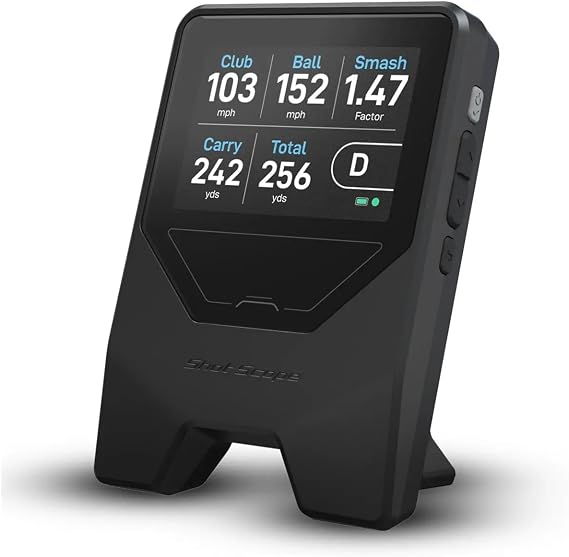
Accurate and user-friendly, the Shot Scope LM1 suits golfers wanting precise ball and club speed tracking at home. Its standout feature is providing instant feedback on every shot, making it simple to track your performance.
Setup is straightforward with the included carry case for portability. Use it indoors or on the course across different session types like On-Course, Practice Range, or Speed Training. The Speed Training mode works well with clubs or speed sticks to focus on swing speeds, which helps maintain consistent practice.
Performance shines with quick, accurate readings of club speed, ball speed, and smash factor right after each shot. The total and carry distance measurements are reliable, supporting detailed shot analysis.
Built compact and lightweight at just 1.4 pounds, it’s comfortable to handle and store. Some mention a learning curve in interpreting the data, but accuracy is rarely questioned.
A clear highlight is the fast, precise tracking of swing and ball metrics that make practice more productive, though some find the data takes time to fully interpret. The device handles speed training and on-course analysis well, offering detailed feedback for every shot.
Golfers who want detailed shot insight and easy portability will appreciate this launch monitor. Those looking for a simpler or more compact design might want to consider other options. Its versatility suits both practice and on-course use.
Pros
- Instant feedback on ball and club speed
- Measures smash factor in real time
- Multiple session types for varied use
- Lightweight and portable design
Cons
- Learning curve in understanding data feedback
- Dimensions may feel bulky for some users
| Specification | Details |
|---|---|
| Item Weight | 1.4 pounds |
| Item Dimensions LxWxH | 8 x 8 x 12 inches |
| Speed Training Mode | Yes, works with clubs and speed sticks |
| Included Components | Carry Case |
| Warranty Description | 2 Years |
8. SkyTrak ST MAX Golf Launch Monitor

SkyTrak ST MAX Golf Launch Monitor is built with compact and sturdy materials, making it a solid choice for golfers wanting detailed data at home. It fits players who want to improve their swing with precise feedback and enjoy in-depth analytics. Its standout strength is the extensive range of measured shot data combined with the free Core Foresight software for a year.
Setting up involves placing the unit in your hitting area and powering it on with the included Lithium Polymer battery. Daily use revolves around quick connections to the software, which offers Speed Training powered by GOLFTEC for guided drills.
Features like bag mapping and randomized practice provide structure without overcomplicating practice sessions, making it suitable for regular use and skill tracking.
Performance-wise, it gives a comprehensive breakdown of every shot by capturing carry, ball speed, spin, launch angle, club path, and more. The build is lightweight at 5 pounds but solid enough to stay stable during indoor sessions.
Its accuracy and detailed stats are praised widely, while some users feel learning all the features can be overwhelming at first.
The most appreciated feature is the detailed shot data combined with guided training tools, which help build swing speed and distance. A common issue reported is the initial learning curve with the software, which can take some time to get comfortable using all its functions effectively.
Golfers wanting detailed analysis and structured practice will appreciate this monitor. Those looking for a simpler, more portable device might consider other options better suited for straightforward use or travel.
Pros
- Measures wide range of shot data
- Includes 1 year free software
- Speed Training drills included
- Lightweight at 5 pounds
Cons
- Software can be complex to learn
- Limited portability due to size
| Specification | Details |
|---|---|
| Package Dimensions | 13.43 x 11.57 x 5.55 inches |
| Item Weight | 5 pounds |
| Batteries | 1 Lithium Polymer batteries required (included) |
| Manufacturer | SkyTrak |
| Included Software | 1 year Core Foresight software |
9. Garmin Approach R10 Launch Monitor Stand Bundle

Lightweight and portable, the Garmin Approach R10 Launch Monitor Stand Bundle is perfect for golfers who want detailed shot analysis anywhere, from the living room to the driving range. Its biggest strength lies in providing comprehensive swing data along with access to thousands of courses through the Home Tee Hero simulator.
Setting it up takes only moments since it’s freestanding and compact, so you can move it between indoors and outdoors without stress. Pairing with your smartphone or tablet is straightforward via Bluetooth, and you’ll appreciate the automatic swing video recording with data overlay on each shot.
The screen is small at 3.5 inches, but the detailed metrics and simulator compatibility keep practice engaging every time.
Delivering precise data like club head speed, ball speed, spin, launch angle, and smash factor helps turn practice into measurable improvement. Build quality supports daily use on various surfaces, and the 10-hour battery life often lasts through long sessions. Some users wish the screen was larger, but most praise the accuracy and portability above all else.
Accuracy and portability receive plenty of praise for making practice accessible anywhere. Common criticism focuses on the small built-in screen size, which some find limiting compared to larger monitors or tablets. The freestanding design and Bluetooth setup mean simple daily use across different settings.
Golfers wanting detailed data and the flexibility to practice indoors or out will find much value here. Those who prefer a larger on-device display or prioritize frequent software updates might consider other options. It suits people ready to use tablets or phones as the primary interface.
Pros
- Portable and lightweight for easy movement
- Comprehensive shot data on every swing
- Automatic swing video with real shot overlay
- Works with multiple popular golf simulators
Cons
- Small 3.5-inch screen limits on-device viewing
- Unknown software update schedule
| Specification | Details |
|---|---|
| Screen Size | 3.5 inches |
| Battery Average Life | 10 hours |
| Connectivity Technology | Bluetooth |
| Mounting Type | Freestanding |
| Compatible Devices | Smartphone, Tablet |
| Operating System | Android, iOS |
10. Foresight Sports GC2 Golf Launch Monitor

Precision matters most with this launch monitor, designed for serious golfers wanting accurate ball data right at home. Its main advantage is the camera-based measurement that captures the ball through impact, not just estimates the data from flight, making it ideal for practice indoors or outdoors.
Setting up is straightforward thanks to its compact size and included alignment stick. The system works well in small spaces like a garage or larger outdoor areas. Powering it up and connecting involves standard cables and the power adapter, making day-to-day use smooth without complicated setups.
Portability helps if shifting between home, range, or course practice sessions.
Accuracy is the key strength, using two high-speed cameras for reliable ball tracking. The build is solid, with durable plastic housing that weighs just under 4 kg, balancing portability with sturdiness. Most praise highlights the precision of the ball data, while the common downside noted relates to occasional setup adjustments needed to keep it perfectly aligned with the hitting area.
Measurements come directly from ball impact using high-speed cameras, delivering precise data golfers need to improve. Some users find maintaining alignment takes a bit of attention to keep results consistent during practice sessions.
Golfers serious about accurate shot analysis and who can dedicate space for setup will appreciate this device. Those seeking something lighter and more portable with less setup might consider simpler options instead.
Pros
- Accurate camera-based ball data measurement
- Compact and portable design
- Works indoors and outdoors reliably
- Comes with alignment stick for setup
Cons
- Requires careful alignment before use
- Weighs nearly 4 kg, less convenient to carry
| Specification | Details |
|---|---|
| Item Package Dimensions L x W x H | 17.09 x 7.24 x 6.26 inches |
| Package Weight | 3.8 kg |
| Model Name | GC2 Launch Monitor |
| Included Components | GC2 Launch Monitor, Power Adapter & Cable, Alignment Stick |
| Warranty Description | 2 Year Manufacturer |
11. TheStack Radar Portable Golf Launch Monitor

Trying to improve your golf swing at home requires accurate, easy-to-access feedback on key metrics like swing speed and ball speed. Perfect for passionate amateurs, TheStack Radar Portable Golf Launch Monitor offers reliable measurements right in your backyard, making speed training and wedge practice straightforward and effective.
Setup is quick since the device connects directly to the free TheStack App via Bluetooth. Once paired, data like swing speed, ball speed, carry distance, and smash factor automatically sync to your phone. The bundled wedging app adds a fun twist by turning wedge practice into interactive sessions, helping you refine distance control without extra gadgets or complicated menus.
The radar’s precision in measuring speeds and estimated distances stands out as its main strength, supported by a compact, lightweight design that fits comfortably in a golf bag or range bag. Customers often highlight how well it aligns with the app for smooth tracking, though some mention occasional hiccups with Bluetooth connectivity. The device feels sturdy despite its small size and light 0.12 kg weight.
Reviews praise the device’s accuracy and smooth app integration for tracking swing and ball speeds, though Bluetooth connectivity issues appear occasionally and carry distance estimates may not always match exact results. Users appreciate how the lightweight design makes it easy to carry around.
Golfers focused on speed training and wedge practice with their smartphones will be satisfied with this monitor. Those requiring highly precise distance measurements or flawless connection might want to consider other options.
Pros
- Accurate swing and ball speed measurements
- Includes gamified wedge practice app
- Compact and lightweight for easy portability
- Automatic data sync to smartphone
Cons
- Bluetooth connection can be inconsistent
- Estimated carry distance may vary slightly
| Specification | Details |
|---|---|
| Item Weight | 0.12 kg |
| Item Package Dimensions L x W x H | 6.89 x 3.23 x 1.38 inches |
| Brand Name | The Stack System |
| Connectivity | Bluetooth to TheStack App (iOS/Android) |
| Sports Type | Golf |
12. FlightScope Mevo Gen2 Portable Launch Monitor

Accurate shot data stands out with the FlightScope Mevo Gen2, ideal for golfers wanting detailed feedback at home or on the range. Its 3D Doppler radar and high-speed image processing deliver reliable numbers indoors and outdoors, appealing especially to those focused on improving every aspect of their game.
Setting up takes just a few minutes, with a handheld design that connects smoothly to iPads and iPhones via Wi-Fi. The included app tracks 18 swing parameters along with putting and chipping data. Playing eight E6 Connect courses keeps practice engaging, while battery life lasts around six hours, enough for a solid session without charging.
Accuracy in tracking full swings and approach shots is impressive, making it easier to dial in distances. The build feels solid and portable, though the touchscreen could be a bit more responsive at times.
Users praise consistent data but sometimes mention a learning curve when first navigating the app features.
Consistent and detailed shot data provides plenty of useful info for practicing, but users often find the app takes some time to get used to, which can slow down early sessions. The touchscreen works but occasionally misses inputs, adding a minor annoyance.
Golfers who want reliable, multi-parameter feedback and portability for indoor/outdoor use will appreciate this monitor. Those seeking a simpler interface or less setup might consider alternatives focused more on ease of use than depth of data.
Pros
- Tracks 18 swing data parameters
- Works indoors and outdoors
- Includes 8 E6 Connect golf courses
- 6-hour battery life for extended use
Cons
- Touchscreen responsiveness can lag
- App navigation has a learning curve
| Specification | Details |
|---|---|
| Connectivity Technology | Wi-Fi |
| Compatible Devices | iPad, iPhone |
| Battery Average Life | 6 hours |
| Operating System | Android, PC, iOS |
| Mounting Type | Handheld |
| Sport Type | Golf |
Best at Home Launch Monitors Comparison Table
| Product | Weight | Dimensions | Battery Life | Warranty |
|---|---|---|---|---|
| Rapsodo Mobile Monitor | 14.1 ounces | 6.85 x 7.72 x 2.28 in | Included Lithium Polymer | 1 year limited |
| Rapsodo MLM2PRO Monitor | 16 ounces | 5.51 x 9.45 x 3.94 in | – | 1 year manufacturer |
| Garmin Approach R10 | – | – | 10 hours | – |
| Voice Caddie Monitor | 1.6 pounds | 8 x 6 x 4 in | – | 1 year manufacturer |
| Garmin Approach R50 | – | – | 4 hours | – |
| Blue Tees Rainmaker | – | – | – | 2 year manufacturer |
| Shot Scope LM1 | 1.4 pounds | 8 x 8 x 12 in | – | 2 years |
| SkyTrak ST MAX | 5 pounds | – | Included Lithium Polymer | – |
| Garmin R10 Stand Bundle | – | – | – | – |
| Foresight GC2 Monitor | 3.8 kg | 17.09 x 7.24 x 6.26 in | – | 2 year manufacturer |
| TheStack Radar Monitor | 0.12 kg | 6.89 x 3.23 x 1.38 in | – | – |
| FlightScope Mevo Gen2 | – | – | 6 hours | – |
- Weight14.1 ounces
- Dimensions6.85 x 7.72 x 2.28 in
- Battery LifeIncluded Lithium Polymer
- Warranty1 year limited
- Weight16 ounces
- Dimensions5.51 x 9.45 x 3.94 in
- Battery Life–
- Warranty1 year manufacturer
- Weight–
- Dimensions–
- Battery Life10 hours
- Warranty–
- Weight1.6 pounds
- Dimensions8 x 6 x 4 in
- Battery Life–
- Warranty1 year manufacturer
- Weight–
- Dimensions–
- Battery Life4 hours
- Warranty–
- Weight–
- Dimensions–
- Battery Life–
- Warranty2 year manufacturer
- Weight1.4 pounds
- Dimensions8 x 8 x 12 in
- Battery Life–
- Warranty2 years
- Weight5 pounds
- Dimensions–
- Battery LifeIncluded Lithium Polymer
- Warranty–
- Weight–
- Dimensions–
- Battery Life–
- Warranty–
- Weight3.8 kg
- Dimensions17.09 x 7.24 x 6.26 in
- Battery Life–
- Warranty2 year manufacturer
- Weight0.12 kg
- Dimensions6.89 x 3.23 x 1.38 in
- Battery Life–
- Warranty–
- Weight–
- Dimensions–
- Battery Life6 hours
- Warranty–
How to Choose the Right at Home Launch Monitor
Choosing the right at home launch monitor depends on accuracy, ease of use, and compatibility with your devices to ensure reliable data and smooth setup. Prioritizing these factors prevents costly mistakes and frustration, making practice more effective and enjoyable.
Accuracy and Data Metrics
Inconsistent ball flight data can turn practice sessions frustrating and unproductive. Devices that fail to accurately track key stats like ball speed, spin, and launch angle often provide misleading feedback, making it harder to identify what changes to your swing actually work.
Several launch monitors focus on capturing multiple parameters simultaneously, including clubhead speed and impact location, offering a fuller picture of your shot performance.
A good unit maintains consistent readings across various shot types, from drives to short chips. Reliable monitors often specify accuracy within about 1-2% for ball speed and a small margin of error on spin rates.
Consistency matters more than a single high reading because it helps you track progress and tweak your technique effectively.
Portability and Setup
Certain models are designed to be lightweight and compact, enabling easy transport between the garage, backyard, or even a local range. Larger or heavier devices can slow down setup and make practice less appealing, especially if the mounting or alignment instructions are fussy. Quick calibration processes reduce downtime, so you spend more time hitting balls.
Typical home-use monitors weigh around 2 to 5 pounds and fit comfortably in a small bag, contrasting with bulkier units meant solely for indoor setups. Measuring less than 12 inches in any dimension allows placement on stable surfaces without occupying too much space. Screw-in or magnetic mounts help with fast alignment and keep the device steady during sessions.
Compatibility and Connectivity
Devices that easily pair with smartphones or tablets via Bluetooth or WiFi enable instant data review and integration with simulation software. A stable wireless connection ensures uninterrupted data flow, which is crucial for sessions that rely on real-time feedback or online competitions.
Some cheaper models experience dropouts beyond short ranges, which interrupts practice focus.
Companion apps often offer enhanced analytics and occasional software updates, improving performance over time. However, not all monitors come with regularly updated software, which can limit new features or bug fixes.
Before buying, checking compatibility with your existing devices and desired golf simulation platforms ensures smooth operation.
Battery Life and Power Options
Devices powered by rechargeable batteries tend to support longer practice sessions without the hassle of replacements. Some units deliver up to 6 hours of continuous use on a single charge, enough for multiple rounds or a full day’s training.
Charging time varies, but most modern monitors reach full capacity within 1-2 hours using USB-C cables or dedicated adapters.
Others rely on replaceable batteries such as AA or AAA, which simplifies swapping but adds ongoing costs. Devices with power-saving modes extend battery life during idle periods.
Convenient charging setups, like USB connectivity, allow for easy recharging from common sources such as power banks or laptops.
Durability and Build Quality
Repeated exposure to sunlight, moisture, or accidental drops can quickly degrade poorly built monitors. Durable units use rugged outer shells made of impact-resistant plastics or metal alloys to protect sensitive components inside. Some models feature rubberized edges or bumpers to absorb shocks without damaging the sensors.
Water resistance, usually indicated by an IP rating, keeps electronics safe during light rain or sweat exposure but may not guarantee submersion safety. A monitor with well-sealed ports and protective covers extends its lifespan considerably. Paying attention to build quality means fewer repairs and replacements over time.
Optimizing Your Golf Practice Routine with a Launch Monitor
Using a launch monitor changes how you practice golf by giving precise feedback on every swing. It measures metrics like ball speed, launch angle, and spin rate, which are hard to gauge on your own. These details help you understand what adjustments improve distance and accuracy.
Practice sessions become more productive with clear data. Focus on one element at a time, such as standing position or club path, while tracking changes in real-time.
Set specific goals based on the numbers rather than feel alone.
- Start with short swings to establish consistent contact.
- Use the device’s shot history feature to compare progress over days.
- Combine filmed swings with launch data for detailed analysis.
This approach turns general range practice into structured improvement, helping golfers work effectively without needing a coach present.
Proper Maintenance and Care for Longevity of Your Launch Monitor
Keeping your launch monitor in good condition ensures accurate readings and extends its service life. Always store the device in a dry, cool place when not in use. Moisture and extreme temperatures can damage sensitive electronics.
Clean the sensors and screens gently with a soft cloth. Avoid harsh chemicals that might scratch surfaces or leave residue.
Regular checks for mounting or positioning stability are important because even slight misalignment impacts measurement accuracy.
- Use manufacturer-recommended charging cables to prevent battery damage.
- Update the device’s firmware as updates become available to fix bugs or add features.
- Handle it carefully during transport to avoid impact stress on internal components.
Proper attention keeps the monitor reliable, saving money on repairs or replacements in the long run.
Common Mistakes to Avoid When Using an At-Home Launch Monitor
One common mistake is positioning the launch monitor incorrectly, which leads to unreliable data. The device needs clear, unobstructed space behind the ball and the correct distance and angle specified by the manufacturer.
Skipping warm-up shots causes misleading readings. Allow the device a few minutes to calibrate and players to settle into comfortable swings. Ignoring environmental conditions like lighting or surface type also skews results.
- Trying to use the monitor outdoors on uneven ground or in bright sunlight often reduces accuracy.
- Failing to read the user manual thoroughly can result in missing setup steps important for certain shot types.
- Viewing data without context leads to confusion; compare numbers with your own expectations or swing videos.
Recognizing these pitfalls helps maintain trust in the monitor’s feedback and supports steady improvement.
People Also Asked
How Accurate Are Launch Monitors for Indoor Use?
Indoor launch monitors are generally accurate enough for practice and improvement, capturing key metrics like ball speed and spin. Positioning and lighting affect readings, so setting up in a well-lit area with a clear view helps maintain consistent results.
What Maintenance Is Required to Keep a Launch Monitor Working?
Keeping a launch monitor clean and free from dust or dirt is important for proper sensor function. Regularly wiping the lenses and storing the device properly when not in use will extend its reliability.
Are Launch Monitors Compatible with All Golf Simulation Software?
Launch monitors vary in software compatibility; many support popular golf simulation programs, but not all. Checking the specific model’s supported software before purchasing avoids unexpected limitations.
How Long Do At-Home Launch Monitors Typically Last?
At-home launch monitors typically last between 3 to 7 years depending on build quality and usage frequency. Treating the device with care and avoiding drops or exposure to moisture can help maximize its lifespan.
What Common Problems Should I Expect with Launch Monitors?
Common issues include sensor calibration errors, connectivity problems, and difficulty reading data in poor lighting conditions. Regular maintenance and following manufacturer setup guidelines lessen the chance of these problems.
Conclusion
Accuracy, ease of setup, and compatibility with your devices matter most when choosing an at-home launch monitor. You want reliable data without a complicated process, and it should work smoothly with your phone, tablet, or computer. Battery life and durability also make a big difference if you plan to use it regularly or in different locations.
Consider how much space you have for swinging and setting up the device, along with how often you’ll use it. Match the monitor to your budget and needs instead of stretching for features you won’t use. For a clear comparison, check the table above and the detailed picks to find what fits your situation best.