
Top 12 Best Launch Monitor Under 500 You Can’t Miss!
Trying to improve your golf swing with a launch monitor that doesn’t track your ball accurately or breaks after a few uses is frustrating. Many people shopping for the best launch monitor under 500 face issues like unreliable shot data and short battery life, which can turn practice sessions into guessing games.
Using a device that overcomplicates setup or requires frequent recalibrations adds to the trouble, cutting into time spent focused on form and distance.
The most important factors in a launch monitor under 500 include measurement accuracy, portability, and battery life. A solid sensor array capable of consistently tracking ball speed, launch angle, and spin rate within a reasonable margin makes a big difference. Devices designed to be compact and weighing under 3 pounds are easier to set up both indoors and at the range.
Battery life around 6 to 10 hours keeps it running through multiple sessions without constant recharging and reduces interruptions during practice.
Need a Quick Check?
| Image | Product | Price |
|---|---|---|
Our Top Picks 1  | Rapsodo Mobile Launch | Check Price |
Our Top Picks 2  | Voice Caddie Portable | Check Price |
Our Top Picks 3  | Garmin Approach R10 | Check Price |
Our Selected Top 12 Launch Monitor Under 500 You Can Trust
This list features affordable launch monitors designed to provide accurate data for golf practice and improvement. Each review explains how well the device performs, identifies the ideal user, and highlights key strengths and potential drawbacks to help readers make informed choices.
1. Rapsodo Mobile Launch Monitor
Offers reliable shot data anywhere you want to practice, perfect for golfers looking to improve without spending a fortune. Its biggest strength lies in delivering detailed feedback on each shot, letting you track your progress wherever you swing.
Setup takes just minutes thanks to its compact size and touchscreen controls. Use it at the range, in your backyard, or indoors with a net.
Each shot you hit shows speed, carry distance, and other key stats instantly. The video replay with shot tracer helps you spot what’s working and what isn’t right after each swing, making practice more productive.
Accuracy and data detail stand out during use, with ball speed, club speed, and shot shape reported every time. The build is lightweight at just 14.1 ounces and small enough to fit in a golf bag easily.
Most users praise the easy-to-use video feature, though some note the 30-day return policy can feel short if you want to test it thoroughly.
Video replay quickly shows each swing with a ball flight tracer, making it easy to identify swing faults. Some users find the return policy brief, which makes testing the device fully a bit challenging before commitment.
Golfers wanting portable, shot-specific data with video feedback will appreciate this tool. Those needing longer testing or advanced metrics beyond carry distance and speed might want to consider more expensive options.
Pros
- Portable and lightweight design
- Accurate ball speed and carry distance
- Video replay with shot tracer included
- Easy touchscreen controls
Cons
- 30-day return window can feel short
- Battery life depends on usage intensity
| Specification | Details |
|---|---|
| Item Weight | 14.1 ounces |
| Product Dimensions | 6.85 x 7.72 x 2.28 inches |
| Item model number | MLM01 |
| Batteries | 1 Lithium Polymer battery required (included) |
| Warranty | 1-year limited warranty, 30-day return policy |
| Voice command | Touchscreen |
2. Voice Caddie Portable Golf Launch Monitor
Crafted from lightweight plastic, the Voice Caddie Portable Golf Launch Monitor offers a simple yet effective way to track key golf metrics. Great for both home and outdoor practice, its biggest strength is the accurate shot analysis powered by Doppler radar technology.
Setup is straightforward, with a compact size of 8 x 6 x 4 inches making it easy to place for swings. The included remote and USB cable allow for quick operation and charging. Tracking swing speed, ball speed, and distances feels reliable while the My Swing Caddie App supplements spin details, adding depth to practice sessions.
Performance is impressive for the price range, providing data like launch angle, apex, and smash factor with small margins of error (±3% ball speed, ±3 yards carry distance in target mode). The plastic build keeps it light at 1.6 pounds, though some find its durability less than premium.
Positive feedback frequently highlights accurate readings, while some mention wanting a sturdier casing.
The launch monitor is praised for providing accurate and useful shot data, especially ball speed and carry distances within tight margins. The most common complaint centers on its plastic build, which can feel less durable compared to heavier units.
Those looking for detailed golf statistics in a lightweight and portable device will find it well-suited. Players seeking a rugged, heavy-duty unit or instant spin numbers without app use might prefer a different model.
Pros
- Doppler radar for accurate shot data
- Lightweight and portable design
- Measures multiple parameters including spin
- Comes with remote and USB cable
Cons
- Build quality feels somewhat fragile
- Spin data requires app for full details
| Specification | Details |
|---|---|
| Item Dimensions LxWxH | 8 x 6 x 4 inches |
| Item Weight | 1.6 pounds |
| Package Weight | 0.79 kg |
| Model Name | Swing Caddie SC300i |
| Warranty Description | 1 year manufacturer |
| Included Components | SC300i/Remote/USB Cable/USB Cover/User Manual |
3. Garmin Approach R10 Golf Launch Monitor
Easy portability and smartphone compatibility stand out right away, making it ideal for golfers aiming to practice at home or on the range. Its biggest strength lies in delivering key swing metrics with reasonable accuracy in a compact, weather-resistant design.
Setup involves pairing with the Garmin Golf app on a compatible smartphone, unlocking data like club head speed and ball spin. The Bluetooth connection works smoothly, and its waterproof IPX7 rating means you don’t worry about sudden rain during outdoor sessions. Voice control adds convenience, while the 10-hour battery life supports extended rounds of practice without frequent charging.
Measurement accuracy stays close to specs, with club head speed within +/- 3 mph and ball speed within +/- 1 mph, offering reliable feedback for improving consistency. The small 0.9-inch screen isn’t for detailed visuals, but it’s designed to be controlled entirely through the app. People praise its portability and detailed data, but some note the limited display and dependency on a smartphone as drawbacks.
Performance generally meets expectations for accuracy and data tracking, making it a dependable tool for practice sessions. The main complaint revolves around the reliance on a smartphone and the minimal information shown on the small screen, which can limit instant feedback without the app.
Golfers wanting a portable, weather-resistant monitor with detailed swing data will be satisfied here. Those who prefer a standalone device with a larger display for quick reads should consider alternatives without smartphone dependency.
Pros
- Accurate key golf metrics with minimal error
- Long 10-hour battery for extended use
- Waterproof design fits outdoor use
- Bluetooth connection with easy app control
Cons
- Small built-in screen lacks detail
- Requires smartphone for complete functionality
| Specification | Details |
|---|---|
| Battery Average Life | 10 hours |
| Connectivity Technology | Bluetooth |
| Control Method | Application, Voice |
| Waterproof Rating | IPX7 |
| Screen Size | 0.9 inches |
4. PRGR HS 130-A Portable Golf Launch Monitor

Accurate golf data without the extra tech fuss makes the PRGR HS 130-A a solid pick for players wanting reliable swing speed and ball flight info. Ideal for those who prefer straightforward results without needing apps or subscriptions.
Setup is easy since it runs on AAA batteries and requires no calibration or pairing with other devices. You can take it out to the range, aim it at your swing, and get instant numbers for club head speed, ball speed, and estimated distances.
It stores up to 500 swings so tracking your progress is simple and direct.
Performance-wise, it uses Doppler radar to deliver consistent readings across drivers, woods, and other clubs. The build feels sturdy enough for regular practice sessions, though it doesn’t connect to Wi-Fi or Bluetooth. The clearest praise is its accuracy compared to more expensive monitors, while some find the lack of app integration limiting for deeper data analysis.
The monitor delivers accurate swing and ball speed data that many find comparable to high-end devices, making it reliable for everyday practice. Many users appreciate its simplicity, though some wish for app features to analyze swings more deeply.
This fits golfers who want straightforward, repeatable data without fuss. Those seeking comprehensive shot tracking or smart device connectivity might want a different model.
Pros
- Accurate club head and ball speed measurement
- No need for apps, Wi-Fi, or Bluetooth
- Simple operation with battery power
- Keeps a history of 500 swings
Cons
- Lacks app support for detailed stats
- Limited to basic distance and speed data
| Specification | Details |
|---|---|
| Brand Name | PRGR |
| Model Number | PRGR-XXX |
| Included Components | Launch Monitor |
| Power Source | AAA batteries |
| Memory | Stores 500 past swings |
5. Rapsodo MLM2PRO Mobile Launch Monitor
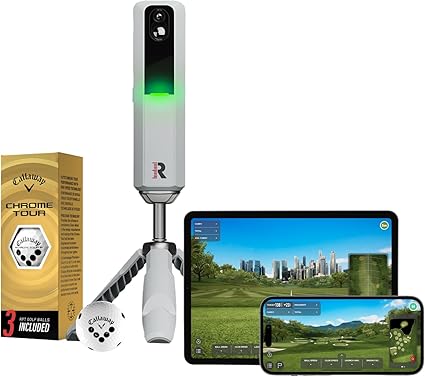
Getting accurate feedback on your golf swing without expensive gear used to be tricky. Perfect for amateur golfers looking to improve without emptying their wallet, the Rapsodo MLM2PRO Mobile Launch Monitor stands out by combining Doppler radar and dual cameras for reliable shot data.
Setting it up takes just moments, thanks to its compact size and touchscreen control. It tracks 15 key golf metrics like spin rate and club speed that matter most during practice.
The 21-day premium trial unlocks simulated courses and training tools, giving variety beyond just stats. Lightweight at one pound, it fits easily in your golf bag so you can take it anywhere.
Accuracy on every shot is the main feature it nails, helping users track detailed flight and impact data. The build is solid yet portable, balancing performance with convenience.
Most praise focuses on shot tracking consistency, while some note the premium trial duration may limit longer-term use for free features.
Users appreciate the dependable shot tracking thanks to the combined radar and cameras. Most common complaints revolve around the limited length of the free premium trial, which restricts access to golf simulation courses and training features after three weeks.
Golfers looking for solid data and portability while practicing at the range will find it suits their needs well. Those wanting permanent unlimited access to simulated courses or a larger display might want to consider other models.
Pros
- Doppler radar and dual camera setup
- Tracks 15 detailed golf metrics
- Includes 21-day premium membership trial
- Lightweight and portable design
Cons
- Premium features only free for 21 days
- Limited screen size at 3 inches
| Specification | Details |
|---|---|
| Item Weight | 1 pounds |
| Product Dimensions | 5.51 x 9.45 x 3.94 inches |
| Display Size | 3 inches |
| Batteries | 1 Lithium Polymer battery required (included) |
| Warranty | 1 Year Manufacturer |
6. Shot Scope LM1 Launch Monitor
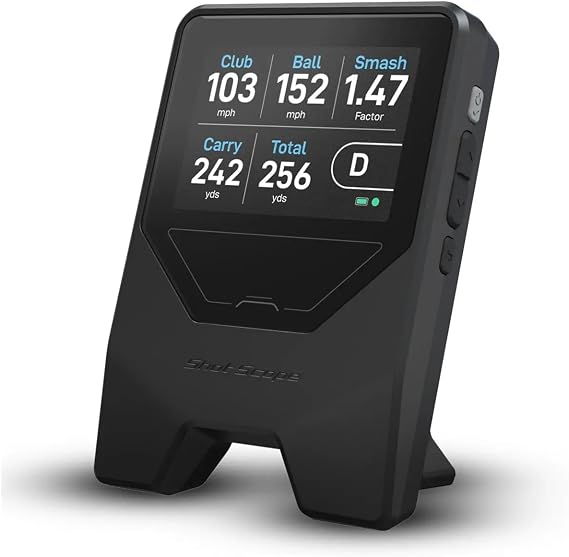
Accurate club and ball speed tracking makes the Shot Scope LM1 a solid choice for golfers wanting detailed shot data without breaking the bank. It suits those looking to measure carry and total distance while improving swing speed through versatile session types on or off the course.
Setup is straightforward, coming with a carry case that makes transport easy. Switching between On-Course, Practice Range, or Speed Training modes lets you tailor each session to your goals.
Real-time smash factor feedback helps you understand your strike quality instantly, while dedicated speed training mode aids consistent swing improvement using clubs or speed sticks.
Performance delivers precise feedback on ball and club speed, along with reliable distance measurements. Build feels sturdy at 1.4 pounds with compact dimensions, making it easy to handle during practice or rounds.
The best praise highlights its accuracy and quick data display. A common drawback is the limited size which some feel reduces visibility during use.
Quick and accurate shot data stands out as the strongest feature, delivering instant feedback that can improve swing efficiency. Commonly mentioned drawback involves the smaller display size, which can make it tricky to see readings during play or practice.
Golfers wanting straightforward speed and distance metrics in a portable tool will appreciate this monitor. Those needing more detailed analytics or a larger viewing screen might want to explore other options outside this price range.
Pros
- Immediate ball and club speed data
- Smash factor feedback after every shot
- Multiple session types including speed training
- Compact and lightweight design with carry case
Cons
- Device size may impact screen visibility
- No advanced features beyond basic speed and distance
| Specification | Details |
|---|---|
| Item Dimensions LxWxH | 8 x 8 x 12 inches |
| Item Weight | 1.4 pounds |
| Package Dimensions L x W x H | 7.2 x 5.55 x 2.48 inches |
| Package Weight | 0.63 kg |
| Model Name | Shot Scope LM1 |
| Warranty | 2 Years |
7. Voice Caddie SC4 PRO Golf Launch Monitor

Golfers looking to improve their game with detailed shot analysis will appreciate the Voice Caddie SC4 PRO Golf Launch Monitor. It suits players practicing indoors or outdoors, with its greatest strength being pro-grade accuracy from swing to ball flight.
Setting up the device is straightforward, with a compact design that fits easily into your practice space. It connects quickly and offers real-time data via the Prometrics Engine.
The included 3D Driving Range and E6 Connect add immersive virtual practice options, making regular training more engaging and varied.
Accuracy in tracking ball and club head data stands out, helping fine-tune every aspect of your swing. The plastic build keeps it lightweight at 590 grams and highly portable.
Some users mention the learning curve with the remote and software as a drawback, but the precise data delivery is highly praised.
Precision in tracking every shot phase is the strongest feature, giving detailed feedback. On the other hand, mastering the remote control and software setup presents challenges for some users.
This monitor fits players serious about improving with accurate data and immersive practice. Those wanting a simpler, more rugged device might prefer a different option.
Pros
- Pro-grade accuracy with Prometrics Engine
- Supports indoor and outdoor practice
- Includes 3D Driving Range and E6 Connect
- Compact and lightweight design
Cons
- Learning curve using remote and software
- Plastic body may feel less durable
| Specification | Details |
|---|---|
| Item Dimensions (LxWxH) | 1.92 x 7.59 x 1.14 inches |
| Item Weight | 590 g |
| Package Dimensions (LxWxH) | 10.31 x 6.18 x 1.81 inches |
| Package Weight | 0.92 kg |
| Warranty | 1 Year |
8. Blue Tees Golf Rainmaker Portable Launch Monitor

Blue Tees Golf Rainmaker stands out for delivering accurate shot data with Doppler radar, making it ideal for golfers who want reliable feedback without the need for ongoing subscriptions. Its portability and detailed metrics suit players practicing in various settings, from backyards to indoor simulators.
Setup involves just placing the device near your hitting area, no complex installation needed. You can use it independently since it offers three standalone training modes and instant shot feedback on its own 4.3 color display.
It works with or without your phone, and taking it to driving ranges or home setups is straightforward thanks to the included carrying case.
Performance-wise, it offers nine real-time metrics, with over 21 accessible via the app, including enhanced spin accuracy using RCT golf balls. The build combines durable ABS plastic and metal parts, reflecting solid construction.
The most frequent praise highlights its accuracy and ease of use, while the primary complaint concerns occasional data variability during certain shots.
High points include impressive shot accuracy that works well in different practice environments, while some moments of less consistent data can occur under certain shot conditions. Carrying it around is easy due to the protective case and light weight, making practice flexible.
Golfers wanting precise stats without subscription hassles will appreciate this device. Those needing flawless data every single time or relying solely on app metrics might want to explore alternatives designed for constant connectivity and advanced analysis.
Pros
- Accurate shot data without need for subscription
- Compact and portable with protective case included
- Three standalone training modes with instant feedback
- Compatible with E6 Connect and GSPro software
Cons
- Occasional shot data inconsistencies reported
- Some advanced metrics require app access
| Specification | Details |
|---|---|
| Dimensions (L x W x H) | 11.26 x 7.6 x 2.83 inches |
| Weight | 1.45 kg |
| Display | 4.3″ color display |
| Included Components | Premium LAUNCH App 12-Month Membership, Magnetic Remote, Carrying Case, USB-C Cable |
| Material | Durable ABS Plastic with Metal Components |
9. TheStack Radar Portable Golf Launch Monitor

Stack System Stack Radar Portable Golf Launch Monitor excels in tracking swing speed, ball speed, and giving an estimated carry distance. Well-suited for golf players focused on speed training and wedge practice, its main strength lies in precise tracking paired with an interactive training app experience.
Setup is straightforward thanks to Bluetooth connectivity linking directly to TheStack App on iOS or Android. The device automatically transmits data to your phone, making every practice session easy to track. Using it at the range or on the course involves simply positioning the compact unit near your swing and letting it record relevant data for analysis without additional hassle.
Accuracy in capturing swing and ball speed is reliable for speed-focused drills. The build is lightweight at 0.12 kg and compact dimensions of roughly 6.9 by 3.2 by 1.4 inches, so it’s easy to carry around.
The best feature is its integration with the gamified wedging app, which keeps practice engaging. A common complaint is limited functionality beyond swing and ball speed measurement.
Users appreciate the reliable measurement accuracy and fun training features within the companion app. The data transfers automatically, which simplifies practice sessions. A notable drawback is the focus on only speed-related stats, which may feel restrictive for those seeking broader shot analysis.
Golfers prioritizing speed training and wedge work will benefit the most from this device. Players wanting more comprehensive launch data might consider alternative launch monitors. It fits well into routines centered on improving specific swing metrics rather than full shot profiling.
Pros
- Accurately measures swing speed and ball speed
- Compact and lightweight for easy transport
- Integrates fully with TheStack App via Bluetooth
- Includes gamified wedge training sessions
Cons
- Limited to swing speed and ball speed metrics
- App exclusively for speed and wedge practice
| Specification | Details |
|---|---|
| Item Package Dimensions L x W x H | 6.89 x 3.23 x 1.38 inches |
| Package Weight | 0.14 kg |
| Item Weight | 0.12 kg |
| Brand Name | The Stack System |
| Manufacturer | The Stack System |
| Part Number | Stack Radar |
10. SkyTrak+ Launch Monitor & Golf Simulator

Feels like having a personal golf coach right in your living room, this launcher suits anyone serious about tracking and improving their swing with detailed metrics. Its biggest strength lies in precise data collection, giving you real feedback on Club Head Speed, Smash Factor, Club Path, and Face Angle that’s hard to beat at this price.
Getting started takes just minutes thanks to a compact size and straightforward setup. Using the Doppler Radar and upgraded Photometric Camera, it tracks shots consistently well. Linking up with apps like WGT by TopGolf and TruGolf E6 Connect lets you practice on thousands of courses, which makes day-to-day training feel more like playing real golf rather than just drills.
Accuracy stands out as the main performance highlight, with solid readings that help you tune your swing effectively. The plastic build is lightweight but sturdy enough for frequent home use.
Praises focus on its detailed club data and wide course options; complaints usually mention occasional connectivity hiccups with simulation software.
Accurate golf data and extensive course options stand out as the strongest positives. Users sometimes face troubles when connecting the device with simulation software, affecting smooth operation. The overall build holds up well but feels basic in material quality.
Golfers focused on detailed swing analysis and playing virtual rounds will appreciate these features. Those needing flawless software compatibility or a more premium-feeling device might want to consider other options.
Pros
- Precise club data with multiple measured metrics
- Access to 100,000+ global golf courses
- Compact and lightweight for easy setup
- Integrates with popular golf simulation apps
Cons
- Connectivity issues reported with some apps
- Build material feels less premium
| Specification | Details |
|---|---|
| Item Dimensions LxWxH | 6 x 3 x 12 inches |
| Item Weight | 16 ounces |
| Package Dimensions L x W x H | 12.95 x 11.42 x 5.67 inches |
| Package Weight | 2.36 kg |
| Part Number | ST-LMO-SKYTRA+ |
| Outer Material | plastic |
11. Portable Golf Launch Monitor & Swing Analyzer

Great value for golfers wanting detailed swing data without ongoing fees, this monitor suits players training indoors or outdoors who want reliable environmental adjustments. Its single biggest strength lies in accurate shot tracking that includes temperature, humidity, and pressure adjustments built in.
Setup is simple, placing the device on its included tripod takes moments, and the compact size fits easily in a golf bag. Using it day-to-day involves hanging onto data like launch angle, ball speed, and spin rate through an app with no subscriptions.
Temperature and barometric pressure sensors help adapt readings in real time, useful during varying weather or indoor conditions.
Accuracy in tracking key launch and swing metrics stands out, delivering detailed insights into attack angle, spin, and speed. The aluminum body gives a solid, durable feel, though it doesn’t capture horizontal club face angle or swing path. The strongest point is consistency in metric readings; the main downside mentioned involves missing some club path data that serious swing analysts might want.
Many appreciate the no-subscription model combined with built-in environmental sensors that adjust data in real time to improve accuracy. The main limitation is the lack of horizontal club face and swing path measurement, which some advanced users may consider essential for deeper swing analysis.
Players who want easy, detailed swing feedback without extra fees will find it very useful. Golfers seeking full swing path or face angle data for advanced coaching will need to look elsewhere.
Pros
- No annual fees or subscription required
- Built-in environmental sensors improve data accuracy
- Portable size with included tripod
- Tracks extensive swing and ball metrics
Cons
- Does not measure horizontal club face angle
- Missing swing path data affects comprehensive analysis
| Specification | Details |
|---|---|
| Item Package Dimensions L x W x H | 8.54 x 6.61 x 1.93 inches |
| Package Weight | 0.63 kg |
| Material | Aluminum |
| Included Components | Golf Launch Monitor, Tripod |
| Model Name | GX-03 |
| Color | Black |
12. GOLFBUDDY Shot Mate Launch Monitor

Built around advanced Doppler radar technology, this golf launch monitor fits well for golfers wanting reliable swing and ball data without spending a lot. Its biggest strength lies in delivering precise metrics like club speed and carry distance, making it suitable for practice and improvement sessions alike.
Setting up involves mounting it on a tripod and powering up, with a clear 5-inch full-color TFT LCD screen offering good visibility in different lighting. You get instant feedback on each shot’s performance, which helps track consistency and swing efficiency. Practice and target modes guide training by focusing on repetition and accuracy.
Shot storage holds up to 1,000 attempts, while recent swings are saved for quick comparison, helping maintain progress over time.
Performance-wise, the radar technology provides accurate swing and ball data that’s useful for refining your game. It’s solidly built with a button interface and offers a long battery life of about 10 hours.
The bright screen auto-adjusts to light conditions, great for outdoor use. One common drawback mentioned is the lack of detailed software update information, which may limit future improvements for some users.
Users find the radar gives reliable and detailed shot metrics that support consistent practice, while the most frequent downside is uncertainty about software updates. This affects confidence in long-term feature improvements.
Golfers wanting straightforward, dependable data in a portable monitor will appreciate this model. Those seeking constant software upgrades or touchscreen controls might want to explore other options.
Pros
- Accurate swing and ball data from radar technology
- Bright, auto-adjusting full-color display
- Practice and target modes for focused training
- Stores up to 1,000 shots for review
Cons
- Software update support details are unclear
- Button interface less intuitive than touchscreens
| Specification | Details |
|---|---|
| Screen Size | 5 inches |
| Connectivity Technology | USB |
| Battery Average Life | 10 hours |
| Display Type | LCD |
| Mounting Type | Tripod Mount |
Best Launch Monitors Under 500 Comparison Table
| Product | Weight | Dimensions | Battery Life | Warranty |
|---|---|---|---|---|
| Rapsodo Mobile Launch | 14.1 ounces | 6.85×7.72×2.28 in | Lithium Polymer included | 1 year limited |
| Voice Caddie Portable | 1.6 pounds | 8x6x4 in | – | 1 year manufacturer |
| Garmin Approach R10 | – | – | 10 hours | – |
| PRGR HS 130-A | – | – | – | Manufacturer warranty |
| Rapsodo MLM2PRO | 1 pound | 5.51×9.45×3.94 in | Lithium Polymer included | 1 year manufacturer |
| Shot Scope LM1 | 1.4 pounds | 8x8x12 in | – | 2 years |
| Voice Caddie SC4 PRO | 590 g | 1.92×7.59×1.14 in | – | 1 year |
| Blue Tees Rainmaker | 1.45 kg | 11.26×7.6×2.83 in | – | 2 years manufacturer |
| TheStack Radar | 0.12 kg | 6.89×3.23×1.38 in | – | – |
| SkyTrak+ Simulator | 16 ounces | 6x3x12 in | – | – |
| Portable Swing Analyzer | 0.63 kg | 8.54×6.61×1.93 in | – | 1 year manufacturer |
| GOLFBUDDY Shot Mate | – | – | 10 hours | – |
- Weight14.1 ounces
- Dimensions6.85×7.72×2.28 in
- Battery LifeLithium Polymer included
- Warranty1 year limited
- Weight1.6 pounds
- Dimensions8x6x4 in
- Battery Life–
- Warranty1 year manufacturer
- Weight–
- Dimensions–
- Battery Life10 hours
- Warranty–
- Weight–
- Dimensions–
- Battery Life–
- WarrantyManufacturer warranty
- Weight1 pound
- Dimensions5.51×9.45×3.94 in
- Battery LifeLithium Polymer included
- Warranty1 year manufacturer
- Weight1.4 pounds
- Dimensions8x8x12 in
- Battery Life–
- Warranty2 years
- Weight590 g
- Dimensions1.92×7.59×1.14 in
- Battery Life–
- Warranty1 year
- Weight1.45 kg
- Dimensions11.26×7.6×2.83 in
- Battery Life–
- Warranty2 years manufacturer
- Weight0.12 kg
- Dimensions6.89×3.23×1.38 in
- Battery Life–
- Warranty–
- Weight16 ounces
- Dimensions6x3x12 in
- Battery Life–
- Warranty–
- Weight0.63 kg
- Dimensions8.54×6.61×1.93 in
- Battery Life–
- Warranty1 year manufacturer
- Weight–
- Dimensions–
- Battery Life10 hours
- Warranty–
How to Choose the Best Launch Monitor Under 500
Accuracy, ease of use, and compatibility with your devices are the most important factors when choosing a launch monitor under 500. Prioritizing these helps ensure reliable performance and avoids spending extra on features you don’t need, saving both money and hassle in the long run.
Accuracy and Data Metrics
Tracking swing metrics often feels useless when the numbers fluctuate wildly between shots. Commonly measured stats include ball speed, spin rate, and launch angle, which provide real insight into a golfer’s performance.
Devices that consistently deliver similar readings under identical conditions save a lot of frustration during practice.
Many models require calibration before use to maintain accuracy. Skipping this step or using monitors that drift over time leads to unreliable data, ruining the chance to track true progress. Accurate launch monitors usually offer specs within 1-2 mph for ball speed and less than 200 rpm variation in spin rate, allowing real confidence in shot evaluation.
Connectivity and Compatibility
Launch devices typically connect to smartphones, tablets, or computers, so knowing what systems they support is vital. Bluetooth remains the most common method, though some models offer WiFi for faster data transfer or USB for more stable connections. Devices that pair quickly with both iOS and Android increase convenience.
Compatibility with popular golf apps also matters. Many players use third-party software to analyze swings or track stats, so a monitor that works seamlessly with apps like Golfshot or TheGrint makes the experience better by eliminating the need to export data manually.
Portability and Size
Smaller monitors that weigh under 3 pounds fit easily in a golf bag or backpack. Dimensions around 6 to 8 inches wide usually balance portability and functionality well. Setting the device up requires minimal effort for frequent use outdoors or indoors, so a simple plug-and-play operation reduces hassle.
Durability is easy to overlook until the device encounters dust, moisture, or accidental drops. Monitors with sturdy plastic casing and rubberized edges tend to hold up better when moved between ranges, courses, or backyard practice areas without needing repairs or replacements.
Battery Life and Power Options
Most monitors now use rechargeable lithium-ion batteries, providing 6 to 8 hours of continuous operation on a single charge. This runtime is sufficient for common practice sessions, avoiding mid-round power loss.
USB-C charging speeds up the process compared to older micro-USB standards.
Some models still rely on disposable batteries, which adds ongoing cost and the risk of running out unexpectedly during sessions. Rechargeable options also often have indicators showing remaining battery life, helping plan practice without interruptions.
Display and Usability
Clear digital displays or smartphone apps with high-contrast fonts make reading shot data easier, especially in bright sunlight. Monitors designed with straightforward menus and large buttons allow quick navigation without fumbling during practice.
Real-time feedback, like shot trajectory graphs or immediate speed readings, helps golfers adjust instantly. Visualization tools that plot ball flight or spin provide better understanding and more actionable insights than simple numbers alone.
Tips for Accurate Measurements When Using Budget Launch Monitors
Placing a budget launch monitor on a stable, flat surface improves reading accuracy significantly. Devices under $500 often rely on infrared or radar technology that requires clear calibration between the sensor and the ball. Keep the launch monitor close to the hitting area but out of the direct swing path to avoid interference.
Use consistent ball positioning and the same tee height to minimize variability between shots. Environmental conditions like bright sunlight or strong shadows can disrupt sensor readings, so try to use the device in consistent lighting.
Charging your launch monitor fully ensures steady performance through your practice session. Recalibrate the device periodically by following the manufacturer’s setup instructions to maintain reliable data, especially if you move it between locations.
Keeping these points in mind helps get the most reliable metrics possible without investing in expensive equipment.
Common Mistakes to Avoid with Entry-Level Launch Monitors
Common errors with entry-level launch monitors include inconsistent setup and ignoring environmental factors. Setting the device at a different angle or distance from the ball each time affects the quality of speed and spin readings. Mistaking foam or oddly textured practice balls for regular ones can cause skewed data.
Many beginners overlook the need to warm up the launch monitor or run a few practice swings to stabilize sensor readings. Relying solely on the data without watching the ball flight or feeling the swing often leads to misguided conclusions.
Another mistake is not updating the device’s firmware or app, which can fix bugs and improve accuracy. Pausing to check these details before a session avoids frustration and improves the usefulness of the information collected during practice.
Comparing Launch Monitors Under 500 to Smartphone Golf Apps
Launch monitors under $500 typically offer more detailed and consistent data than smartphone golf apps, especially for swing speed, ball speed, and carry distance. While apps use the phone camera and require manual input or video analysis, launch monitors deliver real-time numbers without extra steps.
However, apps can provide good shot trace visualization and some offer helpful swing tempo feedback through video playback. The main difference lies in reliability; budget monitors rely on sensor tech designed to track ball and club interaction from the start, whereas apps depend heavily on external factors like lighting and phone positioning. Launch monitors also tend to track multiple shots successively with greater ease.
For players wanting straightforward metrics during practice without complex setup, a dedicated device in the under $500 range offers clear advantages over a phone app alone.
People Also Asked
How Do I Set up My Launch Monitor Properly?
Position the launch monitor according to the manufacturer’s instructions, usually in front of or beside the hitting area with a clear view of the club and ball. Keep the device steady and avoid shadows or bright lights which can affect sensor accuracy.
What Is the Typical Battery Life for a Launch Monitor Under 500?
Most launch monitors under 500 offer around 4 to 6 hours of battery life, enough for a few rounds or practice sessions. Carry a charger or spare batteries if you plan extended use, especially outdoors.
Are Launch Monitors Under 500 Compatible with All Golf Simulators?
Compatibility varies, as some budget monitors connect via Bluetooth or USB to specific simulation apps or platforms. Check the monitor’s supported apps or software before buying if you already own a golf simulator.
How Should I Clean and Maintain My Launch Monitor Safely?
Use a soft, dry cloth to wipe the screen and sensors gently; avoid sprays or liquids that could seep inside and cause damage. Storing the device in its case or a padded bag helps keep it dust-free and safe during transport.
What Common Issues Should I Expect with Budget Launch Monitors?
Expect occasional connectivity issues, sensor misreads, or slower data updates compared to higher-end models. Calibrating the device properly and keeping the lenses clean can reduce errors during use.
Conclusion
Accuracy, ease of use, and compatibility with your devices are the key factors when choosing an affordable launch monitor. You want reliable shot data without complicated setups. Portability might matter if you plan to move the device between locations.
Battery life and how the data syncs to your phone or tablet can also impact your experience.
Consider where you’ll use the monitor most often and how much space you have. Smaller areas need shorter range monitors, while larger spaces can accommodate more advanced tracking. Think about how often you’ll use it to decide if spending close to the budget limit makes sense.
Return to the comparison table and earlier reviews to find the best fit for your needs and environment.